Learn how balances, payouts, and refunds work in Trustap. This guide explains how funds move from completed transactions to payouts, and how refunds are processed after cancellations or disputes.
For a transaction that reaches payout, funds generally move through Trustap in the following order.
| Concept | Applies to | Description |
|---|---|---|
| Balances | Platforms, eCommerce sellers | Funds released to a seller or platform that have not yet been transferred to a bank account. |
| Payouts | Sellers, platforms | Transfers of released funds from Trustap to a connected bank account. |
| Refunds | Buyers | Funds returned to the buyer's original payment method after a cancellation or accepted dispute. |
A payout transfers released funds from Trustap to a connected bank account.
- eCommerce sellers. Receive payouts for completed sales. Choose instant payouts after each transaction, or consolidated daily or weekly payouts.
- Platforms. Receive consolidated payouts for accumulated platform commission fees, typically monthly or bi-weekly.
- Marketplace sellers. Receive payouts automatically for each completed transaction, usually 2–3 business days after the complaint period ends.
A transaction must reach a funds_released status before it becomes eligible for payout.
Payouts may be delayed if the recipient has not completed identity verification (KYC). Read our KYC guide for more information.
A balance represents the funds that have been released to a client, but have not yet been paid out to their bank account. Track account balances directly in the Trustap dashboard under Client Settings.
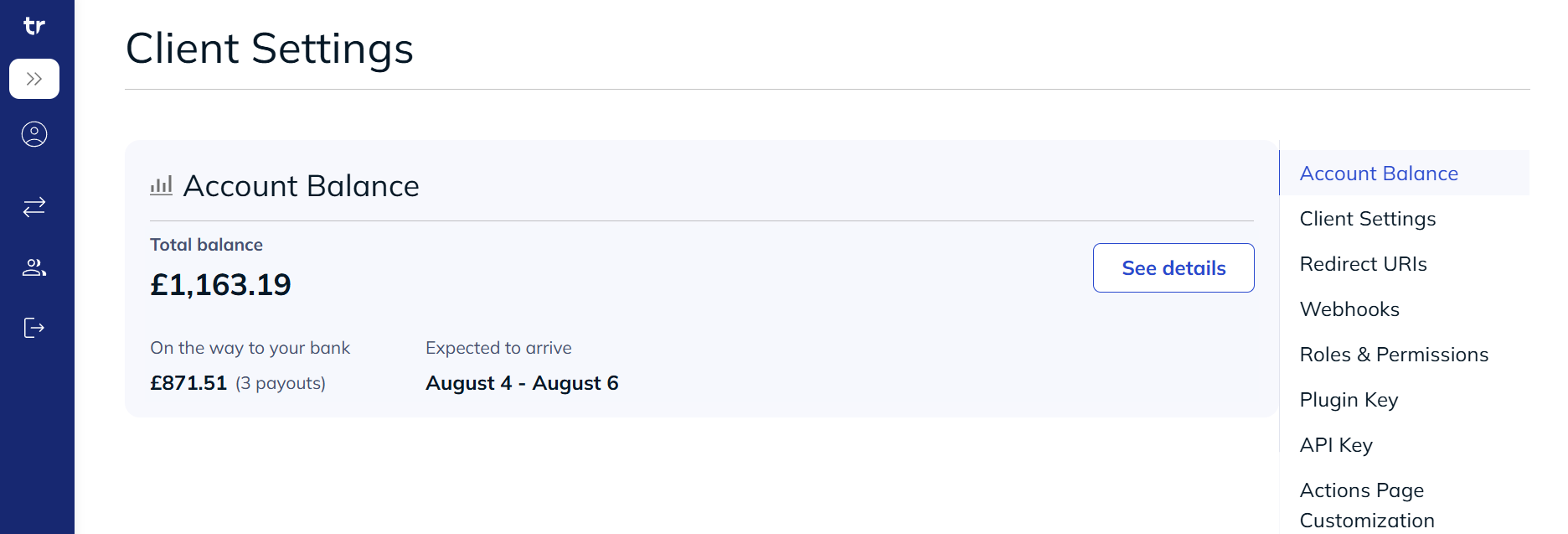
The balance displays the following information.
- Total balance. Total funds currently in a client's balance.
- On the way to your bank. Funds currently being transferred to a client's bank account. This amount may be lower than the total balance because recently received funds will be included in a future payout.
- Expected to arrive. Estimated date range for funds to arrive in the bank account.
Trustap processes refunds when a transaction is cancelled or when a dispute is resolved in the buyer's favor. Refunds are only processed after the buyer has completed payment.
Buyers can only raise complaints during the complaint period. This period starts after a buyer confirms delivery and ends after the set duration (24 hours by default).
To report a transaction that stops progressing, use the order issues feature. For example, a buyer can submit an issue if you do not receive a package marked out for delivery.
Either party can request a cancellation, but handling differs by role.
- Seller cancels. Immediate approval. The buyer is automatically queued for a full refund.
- Buyer cancels. Triggers a Trustap review before funds a refund.
Use Trustap-User to define who is cancelling the transaction.
curl -i -X POST \
  -u '<API_KEY>:' \
  'https://api.test.trustap.com/v2/transactions/<transaction_id>/cancel' \
  -H 'Content-Type: application/json' \
  -H 'Trustap-User: <user_id>' \
  -d '{
    "reason": "out_of_stock"
}'A buyer submits an order issue for transaction problems that occur after payment confirmation, but before shipping or handover confirmation.
curl -i -X POST \
  -u '<API_KEY>:' \
  'https://api.test.trustap.com/v2/transactions/<transaction_id>/submit_order_issue' \
  -H 'Content-Type: application/json' \
  -H 'Trustap-User: <buyer_id>' \
  -d '{
    "category": "item_not_received",
    "description": "Package has not shipped after 7 days."
}'After delivery or handover, buyers can raise a complaint if the item or service is not as expected. See our complaints guide for more details.
curl -i -X POST \
  -u '<API_KEY>:' \
  'https://api.test.trustap.com/v2/transactions/<transaction_id>/submit_complaint' \
  -H 'Content-Type: application/json' \
  -H 'Trustap-User: <buyer_id>' \
  -d '{
    "category": "item_not_received",
    "description": "Package marked as delivered, but was not received."
}'Sellers can accept a complaint outright to speed up resolution. Accepting a complaint immediately closes the transaction, automatically refunds the buyer, and changes the transaction status to refunded.
- Refund amount. The buyer receives a refund for the full purchase price. Platform processing fees, shipping fees, and Trustap service fees are non-refundable.
- Payment destination. Trustap credits refunds back to the original payment method (credit or debit card, or bank account).
| Payment method | Typical processing time |
|---|---|
| Credit / Debit Card | 2–3 business days |
| Bank Transfer / ACH | 3–5 business days |
| International Transfers | Up to 10 business days (varies by issuing bank) |