The following steps show a full transaction from start to finish with a credit card payment. In some cases, Trustap also support some local payment methods. For example, Swish, BLIK, iDEAL, Apple Pay, and Google Pay.
Before you begin this guide, follow our setup guide.
- 1
Create a sellers and buyers
Follow our users guide to create user objects for both seller and buyer.
- 2
Get Trustap Fee (Charge)
Before creating a transaction, retrieve the charge for the transaction. This returns the cost for using the Trustap service for this transaction.
priceis an integer, in which the last 2 digits are the decimal part of the price. For example,price:1050currency:eur= €10.50.curl -i -X GET \ -u '<API_KEY>:' \ 'https://api.test.trustap.com/v2/fees?amount=20000¤cy=eur' - 3
Create a transaction with a seller and buyer
In the Trustap API, the transaction object includes details about the buyer and seller, the type of transaction, and the status of the transaction.
curl -i -X POST \ -u '<API_KEY>:' \ https://api.test.trustap.com/v2/transactions \ -H 'Content-Type: application/json' \ -d '{ "amount": 20000, "amount_extra": 0, "buyer_id": "1-9bb8ca82-de34-4ea3-b335-8622eda41fab", "currency": "eur", "description": "Trustap socks", "fees_buyer": 1050, "fees_config": 1, "fees_seller": 0, "image_url": "https://docs.trustap.com/images/trustap-socks.png", "payment_method": "card", "role": "seller", "seller_id": "1-2bda2d58-3008-406f-a5e9-360f0f13b741" }' - 4
Buyer transfers funds
After a transaction is created, redirect the buyer to the payment page to pay for it.
In the following examples, replace
<CALLBACK_PAYMENT>with the redirect URI you set during your Trustap setup. This is the location where the buyer will be redirected to following payment.Use case URL Test environment https://actions.stage.trustap.com/transactions/{transaction_id}/pay?redirect_uri=<CALLBACK_PAYMENT>Production environment https://actions.trustap.com/transactions/{transaction_id}/pay?<CALLBACK_PAYMENT>For example:
https://actions.stage.trustap.com/transactions/tx_01m4gjye6cea3avfazk3tnpdvf/pay?redirect_uri=https://www.trustap.com/Alternatively, use
payment_linkfrom transaction object and append theredirect_uri.The Trustap API also supports
statewhen sending a buyer to the payment screen.Learn more about
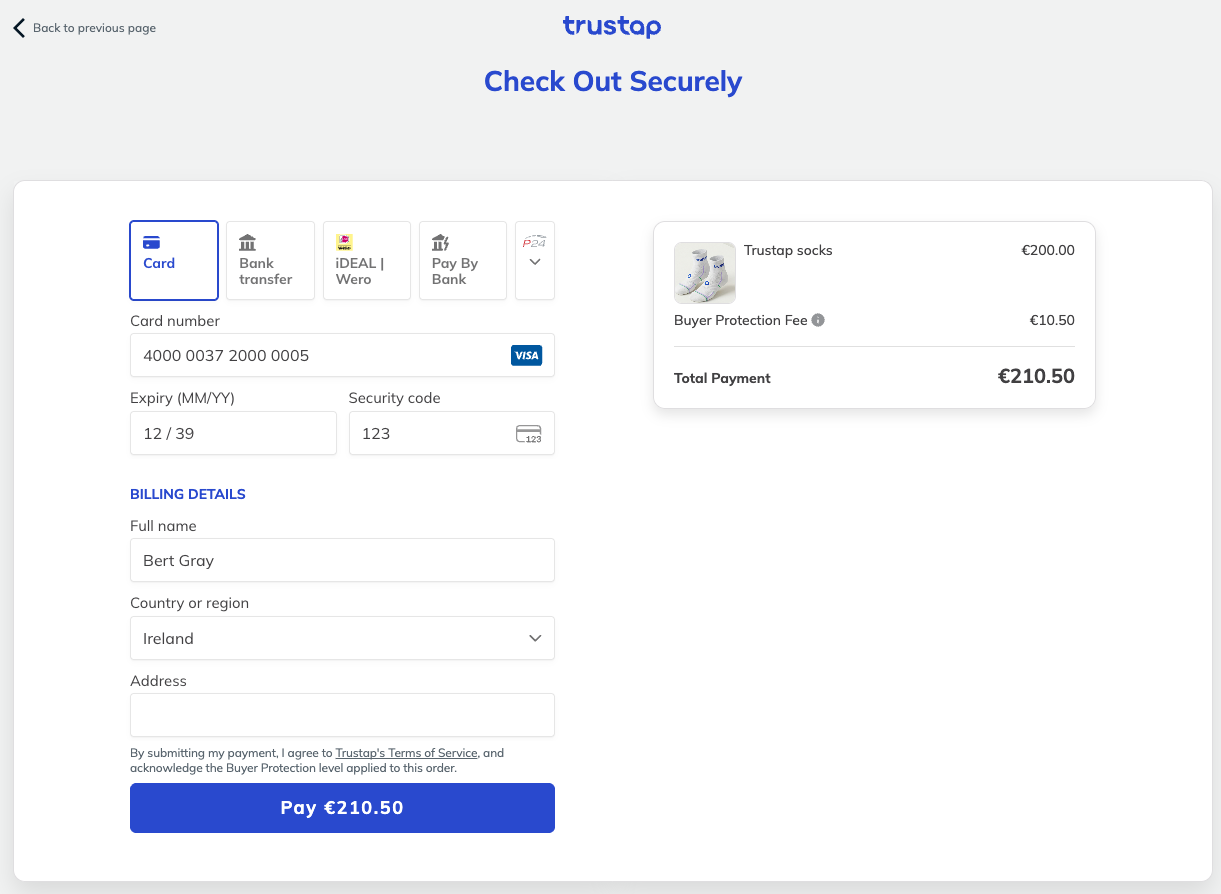
statein our guide.The payment screen looks like the following.
- 5
Seller accepts payment
Once the payment is made by the buyer, the seller can choose to accept the deposit.
curl -i -X POST \ -u '<API_KEY>:' \ 'https://api.test.trustap.com/v2/transactions/tx_01m4gjye6cea3avfazk3tnpdvf/accept_payment' \ -H 'Content-Type: application/json' \ -H 'Trustap-User: 1-2bda2d58-3008-406f-a5e9-360f0f13b741' - 6
Confirm handover
After the physical handover, the buyer or the seller must confirm the handover. The 24-hour complaints period begins when either party confirms the handover.
curl -i -X POST \ -u '47fee92a-c4d1-4f36-b870-01a2b6f9dfdb:' \ 'https://api.test.trustap.com/v2/transactions/tx_01m4gjye6cea3avfazk3tnpdvf/confirm_delivery' \ -H 'Content-Type: application/json' \ -H 'Trustap-User: 1-9bb8ca82-de34-4ea3-b335-8622eda41fab' - 7
Complaints period
At this point, the buyer has the option to create a complaint if they were not satisfied with the transaction. The buyer will receive an email from Trustap with details on how to create a complaint. Submitting complaint will pause any payout until the issue is resolved. The Trustap support team mediate between both buyer and seller to resolve the complaint.
The complaints period typically lasts 24 hours.
Alternatively, you can enable your buyer to manually create a complaint. If a complaint is made, you will receive an email as well as a webhook event.
If no complaint is made within the complaints period, funds are automatically released following the seller claiming the payout.
- 8
Seller claims transaction
- A seller must register for a full Trustap account before they can claim a transaction. See our full user guide for details.
- Using the seller full Trustap account user ID as
Trustap-User, claim the transaction. This links the transaction to their full Trustap account.
Seller claims transactioncurl -i -X POST \ -u '<API_KEY>:' \ 'https://api.test.trustap.com/v2/transactions/tx_01m4gjye6cea3avfazk3tnpdvf/claim' \ -H 'Content-Type: application/json' \ -H 'Trustap-User: ee461c3a-3971-45fa-b361-38694c78f69d' \ -d '{ "role": "seller", }'- Following confirmation of handover and a successful complaints period, the seller will receive the payout from the transaction to their account.