The following steps outline the full process for an online transaction using a bank transfer.
A bank transfer, also known as an Electronic Funds Transfer (EFT), is the digital movement of money between bank accounts. Depending on the region, Trustap supports various EFT methods, including ACH in the US, BACS in the UK, and international wire transfers.
Before you begin this guide, follow our setup guide.
Follow our users guide to create user IDs for both seller and buyer. See our test guide for more information on users for testing bank transfers.
Before creating a transaction, retrieve the charge for the transaction. This returns the cost for using the Trustap service for this transaction.
price is an integer, in which the last 2 digits are the decimal part of the price. For example, price:1050 currency:eur = 10,50€.
curl --location 'https://dev.stage.trustap.com/api/v1/charge?price=20000¤cy=gbp&payment_method=bank_transfer' \
--user '<API_KEY>:'In the Trustap API, the transaction object includes details about the the buyer and seller, the type of transaction, and the status of the transaction.
When requesting bank transfer for payment, set "payment_method": "bank_transfer". If you don't set payment_method the Trustap API uses card as the default value.
curl --location 'https://dev.stage.trustap.com/api/v1/me/transactions/create_with_guest_user' \
--header 'Trustap-User: 1-886e3c26-b585-4c92-a93b-e3c84b9b32e9' \
--header 'Content-Type: application/json' \
--user '<API_KEY>:' \
--data '{
    "seller_id": "1-886e3c26-b585-4c92-a93b-e3c84b9b32e9",
    "buyer_id": "1-be75312f-ef39-4f06-b4c7-d903e96800c3",
    "creator_role": "seller",
    "currency": "gbp",
    "description": "Ireland vs Croatia UEFA Nations League",
    "price": 20000,
    "charge": 1040,
    "charge_calculator_version": 5,
    "payment_method": "bank_transfer",
    "image_url": "https://docs.trustap.com/images/soccer-tickets.png"
}'After a transaction is created, redirected the buyer to the payment page to pay for it. These funds will not be released to the seller until the buyer approves.
The payment URL that you send to the buyer depends on your type of integration.
In the following examples, replace <CALLBACK_PAYMENT> with the redirect URI you set during your Trustap setup. This is the location where the buyer will be redirected to following payment.
| Use case | URL |
|---|---|
| Test environment - Guest buyer | https://actions.stage.trustap.com/online/transactions/{transaction_id}/guest_pay?redirect_uri=<CALLBACK_PAYMENT> |
| Test environment - Full user buyer | https://actions.stage.trustap.com/online/transactions/{transaction_id}/pay?redirect_uri=<CALLBACK_PAYMENT> |
| Production environment - Guest buyer | https://actions.trustap.com/online/transactions/{transaction_id}/guest_pay?<CALLBACK_PAYMENT> |
| Production environment - Full user buyer | https://actions.trustap.com/online/transactions/{transaction_id}/pay?<CALLBACK_PAYMENT> |
For example:
https://actions.stage.trustap.com/online/transactions/25273/guest_pay?redirect_uri=https://www.example.comThe Trustap API also supports state when sending a buyer to the payment screen.
Learn more about state in our guide.
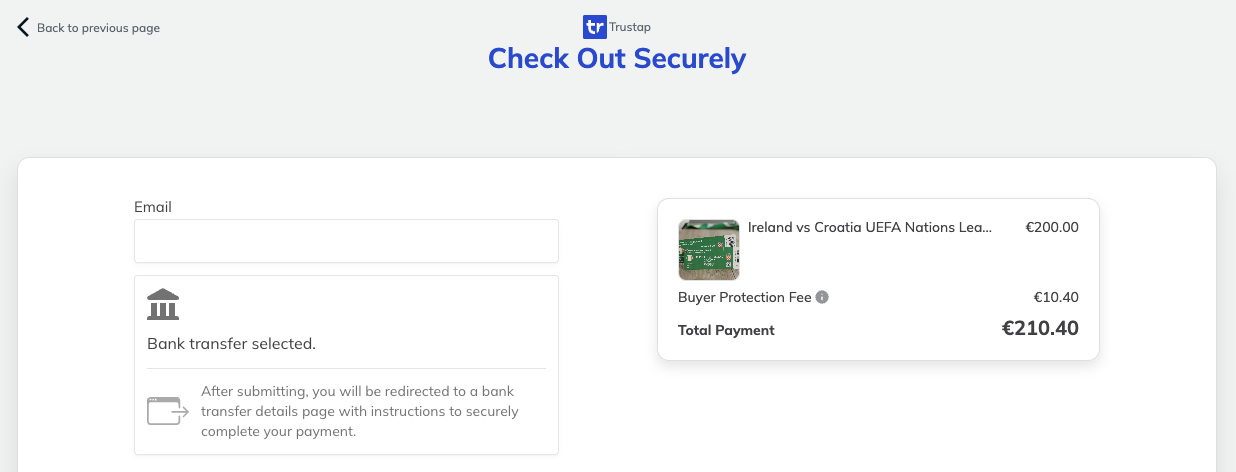
The payment screen looks like the following.
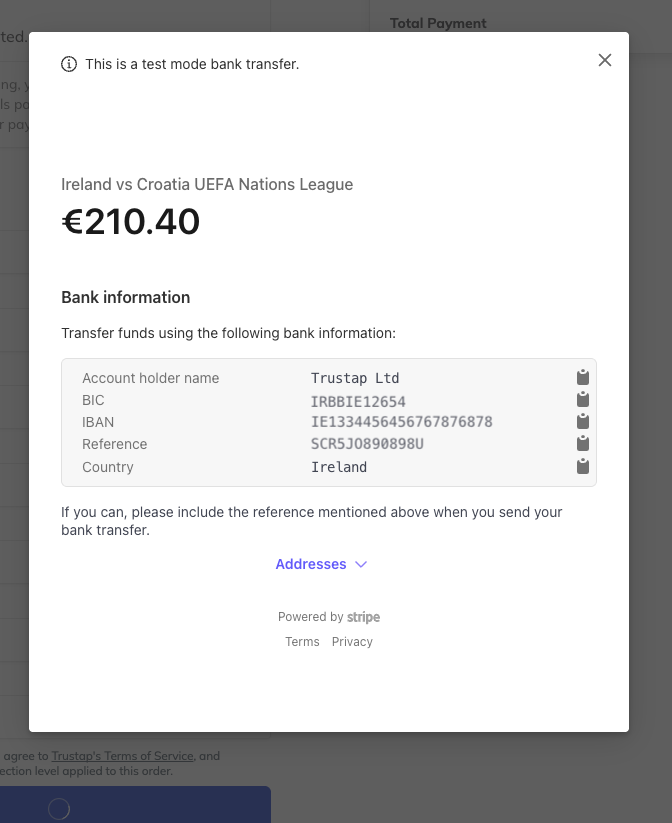
The buyer is shown bank transfer details after they submit their personal details.
Alternatively, use the bank details endpoint.
The response includes all the details needed for a buyer to complete the transaction over a bank transfer. Use the hosted_instructions_url to share instructions on how to use the bank details.
  curl --location 'https://dev.stage.trustap.com/api/v1/transactions/{transaction_id}/bank_transfer_details' \
--user '<API_KEY>:'
If your buyer's account has funds already available, Trustap automatically uses those funds to pay for the transaction.
In this case, you will not see bank details at this step, however funds will transfer and move the transaction status to paid.
The get bank details endpoint returns a 400 error with the code paid_with_balance.
If the buyer's account has funds to partially pay for the transaction, Trustap uses those funds and requests payment for the remaining balance.
The Trustap test buyer account is pre-funded behaves in this way.
When the seller has arranged delivery, they add the tracking details to the transaction.
The Trustap API also supports an integrated shipping solution. See our Shipping guide for more information.
curl --location 'https://dev.stage.trustap.com/api/v1/transactions/25273/track_with_guest_seller' \
--header 'Trustap-User: 1-886e3c26-b585-4c92-a93b-e3c84b9b32e9' \
--header 'Content-Type: application/json' \
--user '<API_KEY>:' \
--data '{
"carrier": "ups",
"tracking_code": "345345123"
}'Once the item has been delivered, the buyer must confirm the delivery was complete before funds can be released to the seller. The complaints period begins (24h) when any of the users confirms the delivery.
curl --location --request POST 'https://dev.stage.trustap.com/api/v1/transactions/25273/confirm_delivery_with_guest_buyer' \
--header 'Trustap-User: 1-886e3c26-b585-4c92-a93b-e3c84b9b32e9' \
--user '<API_KEY>:'At this point, the buyer has an option to create a complaint. This means that were not satisfied with the transaction. A complaint will pause any payout until the dispute has been resolved.
See our guide to create a complaint.
- A seller must register for a full Trustap account before they can claim a transaction. See our full user guide for details.
- Using the seller full Trustap account user ID as
Trustap-User, claim the transaction. This links the transaction to their full Trustap account.
curl --location --request POST 'https://dev.stage.trustap.com/api/v1/transactions/25273/claim_for_seller' \
--header 'Trustap-User: b9c9e108-1edd-5d5e-8268-8873d7beb3e3' \
--user '<API_KEY>:'- Following confirmation of delivery and a successful complaints period, the seller will receive the payout from the transaction to their account.